swan
Showing posts with label APP. Show all posts

tutorial : How to Convert Java(JAD/JAR) to APP

How to??
1. go to http://www.netmite.com/android/srv/2.0/getapk.php

2. select option 2> upload jad and jar of computer / laptop we

3. select "custom orientation"

4. get apk

5. after a few minutes there will be a command to save the apk file ...

6. install and run applications that we convert. (* NET ON)

7. will be automatically downloaded for running java application that we change earlier.

Success

tutorial : How to download android market app or game from pc

conditions: using google chrome (win).

1. Right click on the desktop shortcut google chrome select properties. (create shortcut on the desktop otherwise).
in the target column, after ..... chrome.exe, add a space then add this line after the last space:
code:
- ignore-certificate-errors - allow-running-insecure-content

for example, on my laptop will look like this
code:
C: \ Users \ asus \ AppData \ Local \ Google \ Chrome \ Application \ chrome.exe - ignore-certificate-errors - allow-running-insecure-content

click apply / ok.

2. open google chrome from earlier shortcut, open
code:
http://codekiem.com/2012/02/24/apk-downloader/
and download extension.

If it can not be installed, go to chrome :/ / chrome / extensions /, then drag n drop its extension, later installed himself

3. open the dialer on android phone ente, type in * # * # 8255 # * # * (talk)
look for the line "device id: android-xxxxxxxxxxxxxxxxxx"
I xxxx is the device id on your phone (all numbers)

4. in google chrome click settings (top right of his key image) - tools - extensions
apk downloader on select option. then enter your email address, email pass, and device id and then login.

5. select sim operator of the desired region.

6. after all done, just open the pages of the app you want to download from google play. to download. apk it, just click the icon in the address bar android.

i hope that helps


Good Android Applications photography

 This time we will inform some great photography android applications for you to use. 

Include :

- Snap-Action : Applications are recomended for a moving object, so the application can capture the moment in andrographer shaped photos, more detailed experiment yourself ya ga only because it wrote, there are some fashion choices and fashion effect

- Camera 360 Ultimate : Application for a photo recomended for photos, there are available some effect that makes the images more special.

- Picsay : Application to edit photos. Seru essentially can make more beautiful photos with this app.
 
- Photoshop Express : Almost the same as Picsay application to edit too.
 
- PhotoID : To edit photos as well
 
- Vignette : Application for photos, there is provided a nice effect.
 
- Pudding Camera : Can you take a picture with various effects, can also adjust exposure. Just do not use the English language, is Korean, but the interface is really easy
 
- Retro Camera : Take pictures with effects too, but can not milih2 effect, but given the 5 types of cameras (effect). Overall a good one
 
- Picplz : This is not to take pictures, but to upload images.
Just choose the image would be uploaded, continue to be added the effects provided.

get these applications in the android market.


Record and share with SoundCloud on your Android


SoundCloud will turn your phone into a powerfull audio recording device. There are plenty of ways you can show off your singging talents nowadays, but Soundcloud is one of the first that's available on your android smartphone. The app is essentially a stripped back recording studio, allowing you to belt out your favourite numbers where and whenever you want. It doesn't  take much to get started with the app, and in no time at all you'll have created your own profile and be sharing your voice with your followers. The app supports a range of external accessories to make the recording session feel a lot authentic.For example, you can connect an external microphone to your device, and then record a song using that alongside the app. Another bonus is being able to upload your own album art for every recording. 

In this tutorial, we'll cover the basics of setting up and using the SoundCloud app. We'll show you how to go about recording your voice, what to do afterwards, and how you can then share your work with your friends, family and wider world.


1. Create an Account
After downloading the app from the GooglePlay, you'll be asked to create your own profile. From the home screen you can log in with your facebook detail. If you choose this option then every recording will automatically load on your facebook news feed.


2. Check your stream
From the home page, press on the Stream tab at the top of the app. This will take yo to the latest songs and sound that have been recorded and made public from other users of the app. Each listing has the name of the artist, song name and when it was uploaded.


3. Get a feeling 
Select one of the recordings that takes your fancy. When it has finished loading, press the play option and give the whole piece a thorough listen to. This will give you an idea of the standard of other artist involved, and lets you adjust volume levels as you see fit.


4. View your profile
Now press the you tab at the top of the app. This will take you to your SoundCloud profile, from which you'll be able to see the artists you currently follow, as the people who are curently following you. Every time you record a song, it will be added to your profile.

5. Get pitch perfect
You're now ready to start a recordingin SoundCloud. Press on the record symbol at the top of the app to begin. Depending on the location of the speaker on your device, place your phone away from any outside noise, and attach any microphones you want to use. 


6. First-time users
Press the large record button in the centre of the screen to be taken to your recording. Due to the fact you'll be performing your first attempt, take your time to read through the instructions provided on screen. Once you're ready press the record your first sound tab.


7. Start recording
After a few seconds the recording will start and you'll be able to start singing or recording other sounds. The audio levels will be displayed in the tool bar above the recording symbol, as well as the timing details. Once you've finished, press the recording button a second time.


8. Prewiew your piece
Apreview of your recording will now appear, and you'll be able to skip through to certain parts by pressing on your recording's timeline. If you dont like the recording you can choose the discard option at the bottom to start over, or press the Next button to continue.


9. Add some art
The next screen will allow you to input all the detail about your saved recording. To start with you'll want to add some album art, or just a general picture to make it more recognisable. Press on the empty square and choose from the options provided on screen.


10. You recording location
After entering the name your piece at the top of the screen, select the Where category from the options below. This will let you pinpoint the exact location of the recordingyou just made. Although it doesn't hold any real purpose, it's a nice addition to include.


11. Public or Private?
Near the bottom of the screen you'll be able to choose thether or not you want your recording to be made available for personal use, or if you want others to be able to find it. choose the option that best suits what you want from the app. Press Confirm to SoundCloud's server.


12. Search while you wait
While you're waiting for your upload to finish, go to the Search tab on the homepage and look for other people you'd be interested in listening to. You can also use this page to find people you know via their email, or search by the name of a recording if you wish.


13. Upload complete
Once the upload is complete you'll receive a notivication saying your recording has finished uploading. You can now go back to the Search tab within the app and find your very own recording. Similarly, if you go on to you profile you'll find your first recording listed there.


I hope useful, Thankyou.

3 most important application must be downloaded After Buying Android

Not infrequently, if after buying an Android phone, someone very happy to download many applications. Favorite app is first downloaded generally is Facebook, Twitter, Angry Birds game, and games attract thousands of available and free from the Android Market. From the author's work, many Android users actually forget practical steps for Android phones become more powerful and certainly safer.With Android Market which contain hundreds of thousands of applications, plus the availability of a WiFi connection which must exist on Android. For just a reminder, here are three quick steps to strengthen stamina Android.

 1. Download a New BrowserGenerally, the Android phone users rarely download another browser application. Do not be satisfied with the default browser, you should try other browsers that also support Android, such as Dolphin HD, Firefox, and Skyfire. Each browser has its own character, such as Skyfire can directly open the flash, quite useful if you can not memutat Android files with flash.

2. Download 3G CounterWith all the comfort features offered, it must be admitted that Android phones are voracious consumption of data traffic. For that, install the application data counter, there are many of these applications are available for free on Android Market. One of the best is a 3G Watchdog, an application has the status icon is green / yellow and red in the notification bar 3G/GPRS access when you are nearing or even past the limit specified capacity.3. Download Anti VirusDo not think that anti-virus application just for the computer, or just for smartphones from other OS. To anticipate, do not hesitate to download anti-virus applications on the 'Google Play', such as AVG, Avira, and Symantec, etc.. 


Although you only have to download applications from the Android Market, it does not mean to be free from the threat of viruses / malware. For example, once was, a spread malware in the Android Market managed to infect about 50 million Android gadgets worldwide. To respond to these malware attacks Google released an update to Android gadgets cleanse the infected, called Android Market Security. Most of the Android phones are infected using Operating System v2.2 (Froyo). Malware is a general term used for software or programs designed to damage a computer system secretly.


How to Install Applications other than 'Google Play' to Android phone

'Google Play' (Market Android) offers hundreds of thousands of applications and games that are interesting, where most are offered free. But there are times when you want to try to start a new application, which unfortunately does not exist in the 'Google Play'. By default, Android phones are designed to reject applications that are not listed in the 'Google Play'. This is to prevent users from installing applications that may later be detrimental to the user.
 
The fact that the application is already in the 'Google Play' malware can still be compromised. But if you are sure that the application is useful, and of course the risk is borne by yourself, you could try using this simple trick to add non ori application to the Android phone is being used. Some applications of non 'Google Play' you can find in the apps code, such as in www.4shared.com.

1. To disable blocking the application, go to the Settings, select Applications.


2. then immediately check the 'Unknown sources' (Allow installation on non-Market Applications).


3. Android will warn you if you really want to use non-Market applications. If you believe with this, select OK.


   I hope the above tips useful.

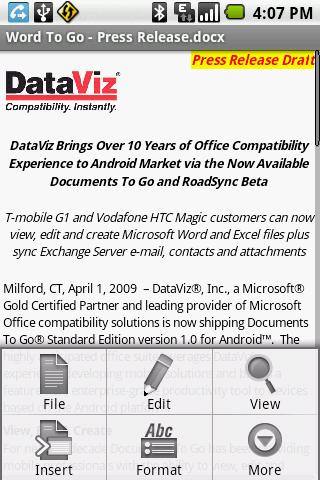
Documents To Go APP is now present in android - Download latest updates Documents To Go 3.0 Main App

View native Microsoft Word, Excel and PowerPoint files & attachments with Documents To Go Main App. Supported file formats include .doc,. docx,. xls,. xlsx,. ppt,. pptx.
When purchased the Full Version Key unlocks the ability to:
�Edit , View & Create Microsoft Word, Excel, & PowerPoint files & high fidelity viewing of your PDFs.
�Supports password protected Word & Excel 97-2010 files.
�Google Docs! Download, view & edit your files from Google Docs directly in Docs To Go.
�Desktop App for bi-directional sync with your device�s USB cable. Seamlessly move files from device to computer using our new, & FREE desktop app (Note: Does NOT support Samsung Galaxy Tab 10.1)

The DataViz Advantage
Docs To Go, now in its 11th year, is developed by DataViz, Inc., a producer of quality software for Windows & Mac for over 26 years. In addition to the Android platform, Documents To Go is also currently available for iPhone, Blackberry, Palm, Maemo & Symbian S60.

Word To Go includes rich formatting features including bold, italics, underline, font color, alignment, bulleted & numbered lists, tables, bookmarks, comments, footnotes, endnotes, track-changes, word count, find & replace, etc.
�Sheet To Go offers powerful data computation with support for 111 functions, cell, number & sheet formatting, row & column preferences, auto-fit options, freeze panes, sort, cut, copy, paste, undo, redo, charting, etc.
�Slideshow To Go allows you to effortlessly �flick� through slides, review notes, rehearse timing & make last minute changes to presentations on the go.
�PDF To Go provides high-fidelity viewing of important reference materials with options for page view, word wrap, auto-rotate, bookmarks, search, select & copy text, and more...
�Google Docs Support Download, view & edit your files from Google Docs directly in Docs To Go. Any changes you make can be saved & synched back to Google Docs so that you'll always have the most up-to-date version. You can even create new files in Docs To Go & upload them immediately to your account.
�Desktop Sync: Transfer files from your Windows PC to your Android device over USB. Any edits made in either location will automatically sync & 100% of the original file formatting will be maintained via our Intact Technology.
�Total access with support for attachments, password-protected files, built-in file browser, memory card support, & new Live Folder for recently used documents
�Localized in English, French, Italian, German, Spanish, Portuguese, Brazilian Portuguese, Japanese, Turkish, Russian, Polish, Czech and Arabic and traditional and simplified Chinese.


Documents To Go 3.0 Main App for Android

DOWNLOAD HERE


Why Documents To Go?
�Full featured Documents To Go is not just a viewer, it's a complete solution with a full range of viewing AND editing features. Simply unlock premium features by purchasing the 'Full Version Key' from the Android Market.
�First to market Documents To Go is the first mobile Office suite for Android that supports editing of native Microsoft Word, Excel & PowerPoint files!
�Powered by InTact Technology. DataViz' acclaimed technology ensures all original file formatting is retained once a file has been edited on an Android device & then forwarded on.
�Send & receive attachments. Documents To Go is tightly integrated with Gmail & other e-mail applications like RoadSync for quick & easy native attachment downloading & sending.
�Native. Open Word & Excel files on your Android phone without any desktop or server conversion needed.
�Nothing new to learn. Documents To Go was designed & developed with the Android device user in mind - everything from the menus to the touchscreen to trackball is supported for a familiar look and feel.


Infolinks APP for Android - Infolinks new mobile application

Introducing Infolinks new mobile application, which is available for Android. With this new cool app you can view your Infolinks reports, clicks, impressions and more in real time. Take your Infolinks earnings on the go!


Now you can take your Infolinks account in real time everywhere you go. With this fast and secure application, you can conveniently track your payments; keep tabs on the status of websites within your Infolinks network and more. Download now to take advantage of this easy-to-use application and stay on top of your earnings on the go.

Infolinks Real-Time allows publishers to access their account and view their websites� information, payment history, account notifications, read our blog and even see stats in real-time. If you haven�t already opened an Infolinks account, sign up today at Infolinks.com and start monetizing your websites or blogs with our variety of ad units.


Infolinks is a complete online advertising platform empowering publishers to make money from the unconventional areas of their websites and blogs. Infolinks functions on intent-based technology and delivers ultra-precise targeted ads to engaged readers. Infolinks ad products are: InText, InFrame, InSearch and InTag. Infolinks global network drives revenue for over 100,000 sites in 128 countries.

DOWNLOAD INFOLINKS APP for ANDROID